How to Monitor Your Miners Programmatically with the NoxHash API
A developer walkthrough for monitoring NoxHash miners via API: auth, polling patterns, offline alerts, webhooks, and a Python sample script you can adapt.

Monitoring your NoxHash miners programmatically means using an API key to pull real-time hashrate, status, and earnings into your own tools — a Python script, a Google Sheet, a Grafana dashboard, or an SMS alert pipeline. This guide walks through the general patterns for building a reliable monitor, including polling, webhooks, and rate-limit etiquette.

Why Monitor Your Miners With an API Instead of the Dashboard
The NoxHash web dashboard is built for humans: you log in, glance at hashrate and BTC balance, and log out. That works for one or two miners. Once you run multiple rentals — or you want alerts when something goes wrong at 3 a.m. — you need a machine watching for you.
An API monitor sits outside the dashboard and pulls the same data on a schedule. It can log earnings to a spreadsheet, push metrics into Grafana, or text you the moment a miner drops offline. You own the logic, so you decide exactly when to get notified and what counts as "a problem."
Offline detection
Get an SMS or email within minutes if a rented miner's status flips from running to stopped — not the next morning when you happen to log in.
Automated reports
Append a daily earnings row to a Google Sheet or a local database. Build a full history independent of dashboard retention, ready for tax or accounting.
Custom dashboards
Pipe metrics into Grafana, Prometheus, or a home-built React page. Blend NoxHash hashrate with BTC price feeds for a true profitability view.
Step 1 — Create an API Key in Your NoxHash Account
Every API call needs an authenticated identity. NoxHash issues personal API keys from your account settings, and you can set an expiry date so a leaked key stops working automatically.
Open Profile → API Keys
Log in, click your avatar, and navigate to the API Keys section of your profile. If you haven't already, turn on 2FA first — you don't want a key-management page protected only by a password.
Generate a new key with an expiry
Give the key a descriptive name ("home-grafana", "sheets-logger") and set an expiry — 90 days is a reasonable default. Short-lived keys limit damage if they ever leak into a Git commit or chat log.
Copy and store the key safely
You'll see the full key exactly once. Paste it into a password manager or an environment-variable store — never hard-code it in source files. On a server, keep it in a .env file that is ignored by Git.
Check the current API docs
Endpoint paths, headers, and rate-limit rules can evolve. Before you code, confirm the exact base URL, authentication header, and miner-listing route in the official NoxHash documentation. The examples below use plausible but generic names — treat them as shapes, not contracts.
Step 2 — A Minimal Python Monitor (Pseudo-code)
Here is a small, readable Python script that authenticates, fetches your miners, and flags any that have been offline for more than 30 minutes. It is deliberately simple — no dependencies beyond requests — so you can drop it into a cron job today and harden it tomorrow.
import os, time, requests
from datetime import datetime, timedelta, timezone

API_BASE = "https://api.noxhash.com/v1"   # confirm in current docs
API_KEY  = os.environ["NOXHASH_API_KEY"]  # never hard-code
OFFLINE_THRESHOLD = timedelta(minutes=30)

headers = {
    "Authorization": f"Bearer {API_KEY}",
    "Accept": "application/json",
}

def fetch_miners():
    r = requests.get(f"{API_BASE}/miners", headers=headers, timeout=10)
    r.raise_for_status()
    return r.json().get("data", [])

def check_offline(miners):
    now = datetime.now(timezone.utc)
    alerts = []
    for m in miners:
        if m["status"] != "running":
            last_seen = datetime.fromisoformat(m["last_seen_at"])
            if now - last_seen > OFFLINE_THRESHOLD:
                alerts.append(m)
    return alerts

def send_sms(miner):
    # plug in Twilio / Vonage / a webhook to your phone
    print(f"ALERT: {miner['name']} offline since {miner['last_seen_at']}")

if __name__ == "__main__":
    while True:
        try:
            for miner in check_offline(fetch_miners()):
                send_sms(miner)
        except requests.HTTPError as e:
            print(f"API error: {e}")
        time.sleep(300)  # poll every 5 minutes — be kind to the API
Prefer JavaScript? The same shape works with fetch in a Node.js script, scheduled with a cron runner or a serverless scheduler. The logic is identical: authenticate, list miners, filter by status and timestamp, notify.
const API_BASE = "https://api.noxhash.com/v1";
const API_KEY  = process.env.NOXHASH_API_KEY;
const OFFLINE_MS = 30 * 60 * 1000;

async function fetchMiners() {
  const res = await fetch(`${API_BASE}/miners`, {
    headers: { Authorization: `Bearer ${API_KEY}` },
  });
  if (!res.ok) throw new Error(`HTTP ${res.status}`);
  const { data } = await res.json();
  return data;
}

function offlineAlerts(miners) {
  const now = Date.now();
  return miners.filter(m =>
    m.status !== "running" &&
    now - new Date(m.last_seen_at).getTime() > OFFLINE_MS
  );
}

setInterval(async () => {
  try {
    const alerts = offlineAlerts(await fetchMiners());
    alerts.forEach(m => console.log(`ALERT: ${m.name} offline`));
  } catch (e) { console.error(e.message); }
}, 5 * 60 * 1000);
Point the script at a real miner in minutes
The Python and Node examples above need one thing to come alive: a NoxHash account with a running miner. Sign up for free, activate the 2-day Basic Miner trial, generate an API key, and run the script against real hashrate data.
Three Use Cases Worth Building First
You don't need to build everything on day one. Pick one of these and ship it this weekend — each is small enough for an evening and genuinely useful on Monday morning.
SMS offline alert
Cron the Python script above on any $5 VPS. Wire the send_sms function to Twilio or a phone webhook. You'll know about a stopped miner before your coffee cools.
Daily Google Sheet log
Use Google Apps Script for Sheets to fetch NoxHash daily earnings and append one row per miner each morning. Perfect for tax records and quick charts.
Grafana dashboard
Push hashrate and BTC earnings into Prometheus via a small exporter, then graph them alongside BTC price. One glance tells you whether your miners outperformed the market this week.
Polling vs Webhooks — Which Pattern Fits?
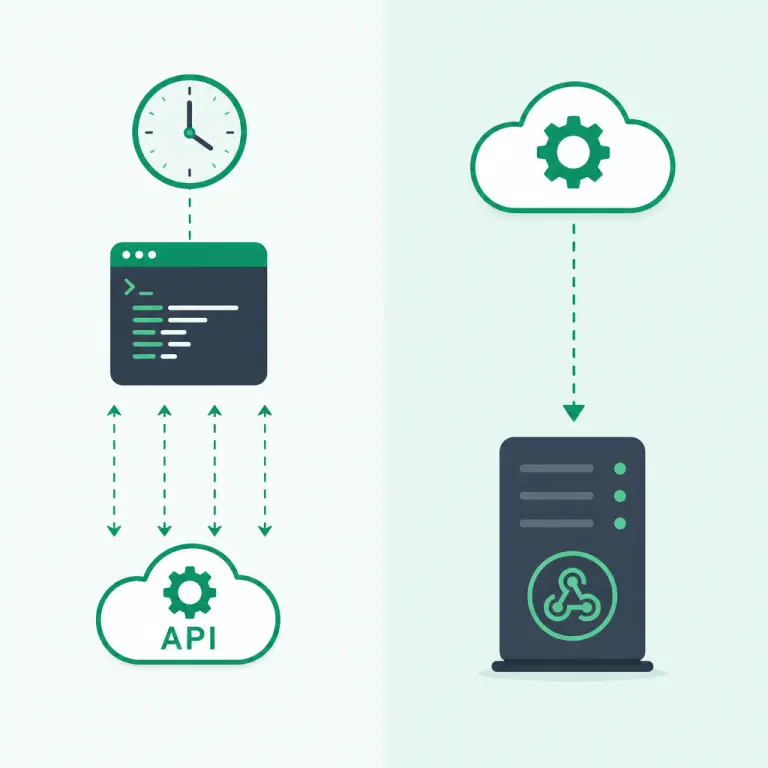
Polling means your script asks the API "what's new?" on a timer. Webhooks reverse the flow: NoxHash pushes events to a URL you host. Both have a place. If the API currently supports webhooks for the events you care about, they are cheaper and faster; if not, a polite polling loop works fine.
| Factor | Webhooks | Polling |
|---|---|---|
| Latency on status change | Seconds | Up to one polling interval |
| API request volume | Only when events happen | Every tick, event or not |
| Infrastructure required | Public HTTPS endpoint | Any cron-capable machine |
| Handling missed events | Relies on retry + signature check | Self-healing — next tick catches up |
| Best for | Low-latency alerts, many miners | Simple scripts, periodic reports |
A hybrid is often the right answer: webhooks for critical alerts (miner offline, rental near expiry), polling for periodic summaries (daily earnings log, weekly report). Pick based on which events the API surfaces and how tolerant you are of a 1 to 5 minute delay.
Rate-Limit Etiquette and Key Hygiene
An API you abuse is an API you lose. NoxHash, like every serious platform, enforces rate limits and may temporarily block keys that behave badly. A few habits keep your integration welcome and your account safe.
Poll every 1 to 5 minutes
Hashrate on NoxHash updates on a minute-level cadence. Polling every second buys you no fresher data, just rate-limit penalties. 60 to 300 second intervals are the sweet spot.
Back off on 429 responses
If you get HTTP 429 (Too Many Requests), respect the Retry-After header and double your interval. Exponential backoff beats hammering the endpoint into a hard block.
Never commit your key
Keep the key in an environment variable or a secret manager. Scan your Git history before pushing. Rotate the key immediately if you suspect exposure — that's what short expiries are for.
One key per integration
Use a separate key for each script or server. When one is compromised or deprecated, you can revoke it without breaking the others. Name keys after what they do, not where they live.
Frequently Asked Questions
Do I need coding experience to monitor my miners?
Not for the dashboard — it covers most needs without a single line of code. You only need basic Python or JavaScript skills when you want custom automation: SMS alerts, spreadsheet logging, or a Grafana view. A Google Apps Script in Sheets is often enough for non-developers.
How often can I safely call the API?
Polling every 1 to 5 minutes is plenty for mining monitoring — NoxHash hashrate and earnings update on a minute-level cadence, so calling more often gives you no fresh data. Always check the current API docs for the exact rate-limit numbers and honor any Retry-After header.
What happens if my API key leaks?
Revoke the key immediately from the API Keys page in your profile, then generate a new one and update your scripts. Short expiries (for example, 90 days) limit exposure automatically. 2FA on your account adds a second barrier even if credentials and a key are both stolen.
Can I use the API from a serverless function?
Yes — AWS Lambda, Cloudflare Workers, Google Cloud Functions, and Vercel Cron all work well for scheduled checks every few minutes. Store the API key in the provider's secret manager rather than inline, and wrap the request in a timeout so a slow API call does not exhaust your function quota.
Do webhooks replace polling entirely?
Usually not. Webhooks handle discrete events like "miner went offline" instantly, but you still need polling or a snapshot endpoint for daily totals, historical charts, and reconciliation after missed deliveries. Most production integrations combine both: webhooks for alerts, polling for summaries.
Will my monitoring script affect mining earnings?
No. The API is read-only for monitoring endpoints — polling status and earnings does not touch hashrate, uptime, or payouts. Your rented miner keeps running on NoxHash infrastructure regardless of how often your script checks on it.
Not financial or security advice
This guide describes general API-monitoring patterns for educational purposes. Endpoint paths, rate limits, and webhook support may change — always verify against the current NoxHash API documentation before writing production code. Mining earnings depend on BTC price, network difficulty, and market conditions, all of which can move quickly; past performance does not guarantee future results. Only commit funds you can afford to lose, and consult a local tax advisor for questions about crypto earnings in your country.