5 Tips to Keep Your NoxHash Account Secure
Protect your NoxHash account and BTC earnings with 5 practical security tips: 2FA, strong passwords, phishing defense, login monitoring, and scam awareness.
Your NoxHash account holds real BTC earnings from miners running 24/7 in our Kazakhstan data center, which makes it a target worth protecting. These 5 practical tips — 2FA with recovery codes, a unique password, bookmarked URLs, login monitoring, and scam awareness — take about 10 minutes to set up and block the attacks that matter most.
Why Account Security Matters for Cloud Mining
Unlike a regular web app, a cloud mining account represents accumulating value: BTC earnings drip into your wallet every minute, USDT deposits sit ready to fund new miners, and your profile carries withdrawal addresses an attacker could modify. One stolen session is enough to redirect funds you've earned over months.
The good news: most real-world attacks rely on basic mistakes — reused passwords, phishing links, or trusting a "support agent" on Telegram. The five tips below each close one of those doors. According to the CISA Shields Up guidance, enabling multi-factor authentication alone blocks the vast majority of automated account-takeover attempts.
Tip 1 — Enable 2FA and Store Your 8 Recovery Codes
The risk: a leaked or guessed password alone lets an attacker log in, drain your wallet, or change your withdrawal address. Password-only accounts are the single largest source of crypto account takeovers.
The action: open Profile → Security in NoxHash, scan the QR code with Google Authenticator, Authy, or 1Password, and confirm with the 6-digit code. NoxHash immediately issues 8 single-use recovery codes — download them, print them, or save them inside your password manager. Each code works exactly once if you lose your phone.
Why it works: TOTP codes rotate every 30 seconds and never leave your device. Even if an attacker captures your password via a data breach on another site, they still need your physical phone to log in. Recovery codes prevent the other failure mode — lockout — so you never lose access to your own BTC.
Tip 2 — Use a Unique, Strong Password from a Password Manager
The risk: password reuse. If you use the same password on NoxHash that you use on a forum breached three years ago, credential-stuffing bots will eventually try that combination against every crypto platform they know.
The action: install a reputable password manager — Bitwarden (free, open-source), 1Password, or Proton Pass — and let it generate a random 16+ character password for NoxHash. Never type the password manually anywhere else. This aligns with NIST SP 800-63B password guidance: long, unique, machine-generated strings outperform short "memorable" passwords by a large margin.
Bitwarden
Free tier covers unlimited passwords on all devices. Open-source and audited — a solid default for most users.
1Password
Paid, polished family and business plans. Includes Watchtower alerts when your credentials appear in known breaches.
Proton Pass
End-to-end encrypted, from the team behind Proton Mail. Good pick if you already live in the Proton ecosystem.
Why it works: a unique 16-character random password cannot be cracked in any realistic timeframe and is useless to credential-stuffing bots. If your email is exposed in a future breach, your NoxHash account stays untouched because the password only lives on this one site.
Tip 3 — Bookmark the Genuine URL and Never Click Login Links
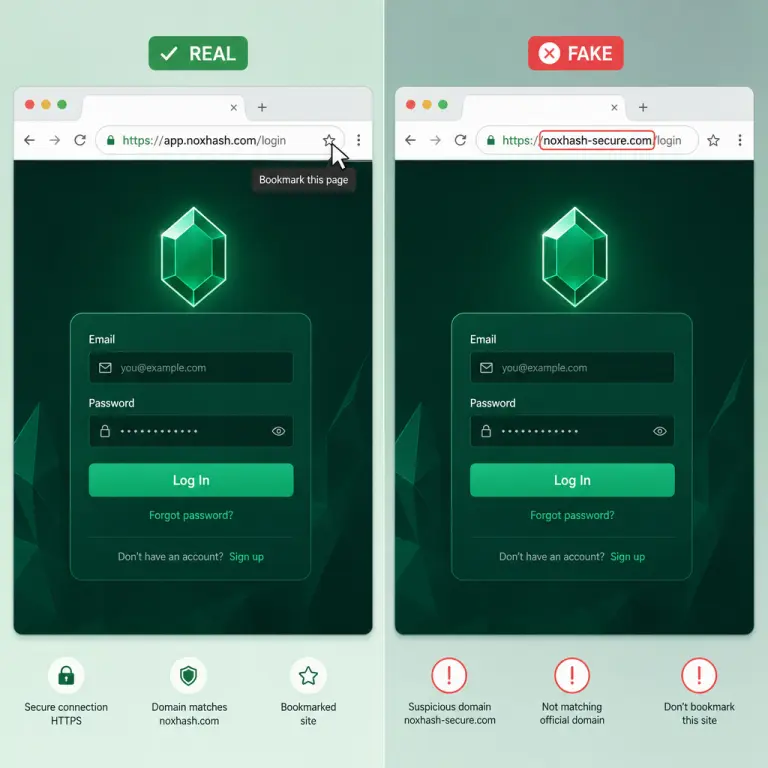
The risk: phishing. Attackers register lookalike domains (noxhαsh.com, nox-hash.io) and send emails, Telegram messages, or buy search ads that mimic NoxHash perfectly. You click, enter credentials, and the fake site forwards them in real time to the real NoxHash — including your 2FA code.
The action: the first time you visit NoxHash, bookmark the real URL in your browser. From that point on, only reach NoxHash through the bookmark. Treat every email link, Telegram link, ad, or Google result as untrusted. If you receive an email that looks like NoxHash support, ignore its links and navigate to the site via your bookmark to check.
Why it works: the entire phishing funnel depends on you arriving at the wrong domain. Remove that step and the attack fails, even if the message looks flawless. Real-time 2FA phishing kits cannot impersonate a domain you reach through your own bookmark.
Tip 4 — Monitor Recent Login Activity Regularly
The risk: silent compromise. If an attacker does slip in — maybe through a shared device or an old session token — they'll try to stay quiet for as long as possible while they wait for your wallet to fill up. Catching unauthorized access early lets you rotate credentials before anything is withdrawn.
The action: open Profile → Recent Activity once a week. Each entry shows the IP address, device (browser + OS), and approximate location of every login. Spot anything you didn't do — a country you've never visited, a browser you don't use, a time you were asleep — and treat it as a compromise: change your password, rotate 2FA, revoke active sessions, and contact support.
What a normal activity log looks like
- Same city or region every time (your home ISP or regular mobile network).
- Devices and browsers you actually use (e.g. Chrome on Windows, Safari on iPhone).
- Timestamps that match your habits — no 3 AM sessions if you never use it overnight.
Why it works: attackers cannot hide which IP they connect from. Even if they route through a VPN, the country or ISP will be different from your usual profile. A weekly 30-second glance at the activity log is often the earliest possible signal that something is wrong.
Tip 5 — Beware Social Engineering and Fake "Support"
The risk: a human attacker is often more dangerous than a technical one. They'll message you on Telegram pretending to be "NoxHash support", ask you to screen-share to "fix a deposit issue", or DM a "giveaway" requiring you to read out your 2FA code. These work because they feel helpful and urgent.
The simple rule that defeats every variant of this attack:
No NoxHash staff member will ever ask for your password, 2FA code, recovery codes, or for remote control of your computer. Ever.
Anyone who does is impersonating us. Close the chat, block the account, and reach out through the official support channel on the site — never through a link or contact the stranger gives you.
The action: only trust official NoxHash communications you reach by starting from your bookmark — the in-app support center, the help article list, the verified email domain. Screenshot and report any Telegram, Discord, WhatsApp, or SMS that claims to be support. Slow down on urgency: "your account will be locked in 10 minutes" is a manipulation tactic, not a real policy.
Why it works: legitimate support never needs your secrets to help you — our admin tools let staff assist without ever seeing your password or 2FA code. The moment someone asks for them, you know with certainty it's an impostor. That single rule collapses an entire category of attack.
The 5 Tips at a Glance
1. Turn on 2FA, save all 8 codes
Profile → Security, scan with Authenticator, store recovery codes in your password manager.
2. Unique 16+ char password
Generate with Bitwarden, 1Password, or Proton Pass. Never reuse a password from any other site.
3. Bookmark the real URL
Reach NoxHash only via your bookmark. Ignore login links in emails, Telegram, or ads.
4. Check Recent Activity weekly
Profile → Recent Activity. Review IP, device, location. Unknown entry = immediate credential reset.
Lock down your NoxHash account today
Open your account and apply the 5 tips above in one sitting: enable 2FA, save the 8 recovery codes, rotate to a unique password, bookmark the real URL, and check Recent Activity. Your BTC earnings deserve the same care as the miners producing them.
Frequently Asked Questions
What happens if I lose my 2FA phone and my recovery codes?
Without both, account recovery requires verifying ownership through our support team and can take several days. That is exactly why storing the 8 recovery codes in a password manager or printed in a safe place is essential. Generate a fresh set and save them the moment you enable 2FA.
Is SMS-based 2FA acceptable for my NoxHash account?
NoxHash uses TOTP app-based 2FA, not SMS. That is intentional: SMS is vulnerable to SIM-swap attacks where a fraudster ports your number to their device. An authenticator app generates codes offline on your phone, so there is nothing to intercept or hijack remotely.
How do I spot a fake NoxHash website or email?
Inspect the domain character by character — attackers swap letters like o/0 or use Unicode lookalikes. Real NoxHash emails never ask you to "verify your password" or "unlock" your wallet by clicking a link. When in doubt, ignore the email and visit the site through your browser bookmark instead.
Someone on Telegram claiming to be NoxHash support asked for my 2FA code — is that normal?
No — it is a scam, without exception. Real NoxHash staff never request your password, 2FA code, or recovery codes, and never need remote control of your computer. Block the account, screenshot the conversation for your records, and report it through official support via the site.
How often should I change my NoxHash password?
Modern security guidance says change it when there is a reason — a breach alert from your password manager, a suspicious login in Recent Activity, or you suspect compromise. Rotating a strong unique password on a fixed schedule adds little value and often leads to weaker passwords over time.
What should I do if I see a login I don't recognize in Recent Activity?
Treat it as confirmed compromise. Immediately change your password, regenerate 2FA and recovery codes, revoke any active sessions, and review withdrawal addresses to make sure they weren't modified. Then contact support through the site so we can help investigate and lock down further.
Security guidance, not financial advice
This article covers account-security best practices only. No security setup eliminates all risk — determined attackers evolve, and you remain responsible for protecting the devices, email, and password manager you use to access NoxHash. Cloud mining itself carries market risk: BTC earnings depend on Bitcoin price, network difficulty, and market conditions, all of which can change. Only commit funds you can afford to lose.