Real-Time Crypto Price Ticker Lands on the NoxHash Dashboard
NoxHash now shows live BTC, ETH, USDT, BNB, SOL and LTC prices on your mining dashboard — next to your BTC balance, earnings chart and active rigs.
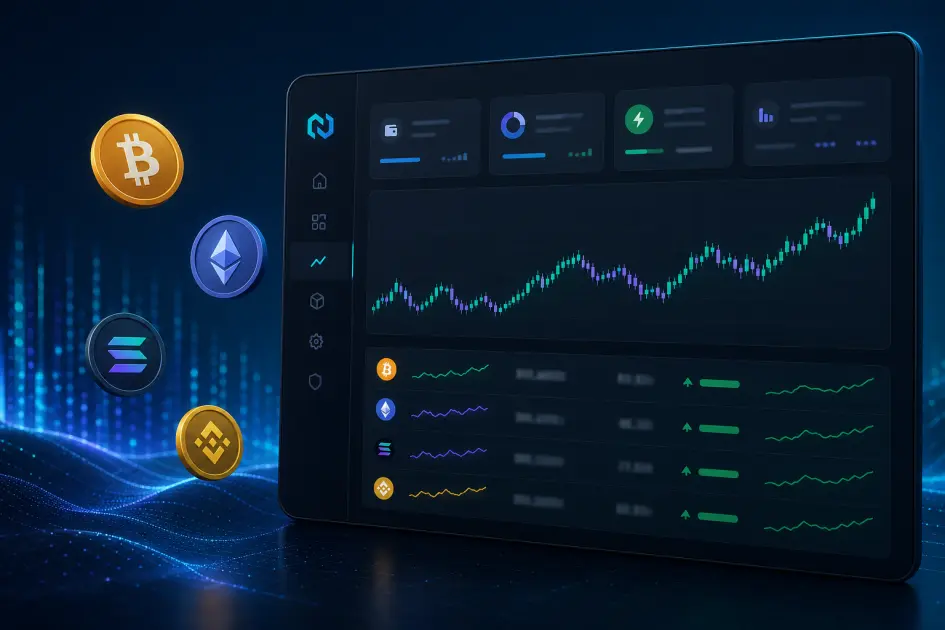
The NoxHash mining dashboard now ships with a real-time crypto price ticker covering six assets: BTC, ETH, USDT, BNB, SOL and LTC. It sits next to your BTC wallet balance, the 30-day earnings chart and your active miners — so you can read the market without leaving the page where your hashrate lives.
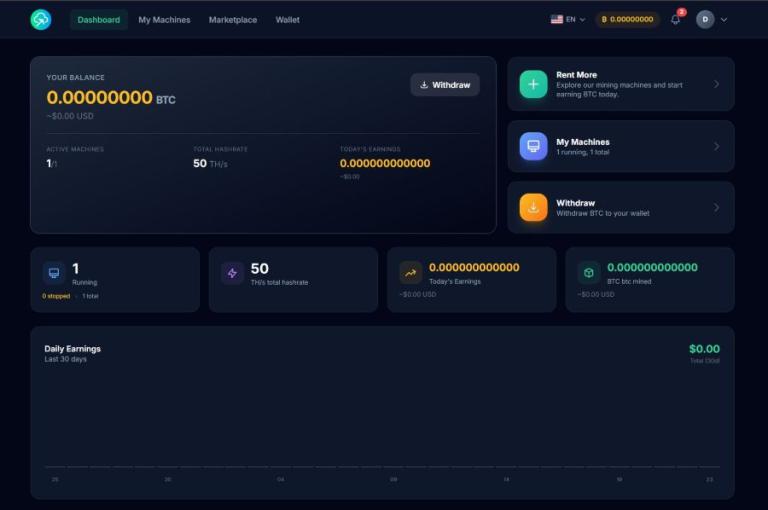
What the Ticker Shows
The price ticker is a compact table pinned to the main dashboard view. It lists six coins in a fixed order — BTC, ETH, USDT, BNB, SOL and LTC — with live USD prices that refresh while the page is open. You do not configure it, you do not toggle it on; it is simply part of the dashboard that every account sees the first time they log in.
The lineup is not random. BTC is the asset your earnings are denominated in. USDT is what you fund the platform with. ETH, BNB, SOL and LTC round out the top of the majors list so the ticker doubles as a market snapshot, not just a single-pair quote.
Live prices for 6 majors
BTC, ETH, USDT, BNB, SOL and LTC — the mining reward asset, the billing stablecoin, and four top-cap majors so you have enough context to read market regime, not just a single quote.
Refresh while the page is open
Prices poll in the background and update in place — no hard refresh, no loading flicker. Leave the tab open beside your miners and the numbers stay current.
Part of the main dashboard
The ticker lives alongside your BTC balance, active rigs, 30-day earnings bar chart and recent transactions. One page, one scroll, the whole picture.
Why a Price Ticker Belongs on a Mining Dashboard
Cloud mining on NoxHash has two currencies running through it at all times. You pay the monthly plan fee in USDT, and you receive mining rewards in BTC. That means two things you want to know at a glance: where BTC sits today, and whether the dollar you funded the wallet with is still worth a dollar.
Before the ticker, answering either question meant tabbing out to CoinGecko or a wallet app. Fine once, tedious five times an hour when a miner just finished its first day of accrual. Putting the prices on the dashboard collapses that whole loop into a glance at the same card where your earnings already live — the same card you were already looking at.
The four extra coins (ETH, BNB, SOL, LTC) exist for context. If BTC is up 3% but every other major is up 6%, that's a different story than BTC leading the pack alone. Miners who care about timing their withdrawals or reading the broader crypto cycle get that context for free, in the same place where the withdrawal button lives.
Three Ways Miners Are Already Using It
We rolled the ticker into the dashboard quietly and watched the usage patterns. Three stood out, and they map cleanly onto three different mining styles.
Timing withdrawals when BTC is strong
Users who withdraw to an external BTC wallet check the ticker before hitting the 1.5% withdrawal button. If BTC is green on the day and LTC and SOL are following, that's a different decision than pulling funds mid-drawdown.
Spotting regime shifts across majors
BTC alone doesn't tell you whether the market is rotating. Seeing ETH, BNB and SOL beside it gives a rough read: broad risk-on days, BTC-dominance days, and stablecoin-only days where nothing is moving and you hold.
Context-switching without leaving NoxHash
This is the quiet one, and it's the biggest. A mining dashboard you check twice a day turns into a mining dashboard you check five times a day once the prices are there — because you were going to pull up a price chart anyway. More eyes on the dashboard is more time spent noticing actual mining events.
See all three patterns on your own dashboard
Claim the 2-day Basic Miner trial, open the dashboard, and the BTC / ETH / USDT / BNB / SOL / LTC ticker is already there — next to your trial miner's live hashrate. No deposit required to watch the market from the same page as your earnings.
Where the Ticker Sits Inside the Dashboard
The dashboard is already a dense page — wallet, miners, earnings, transactions. Adding the ticker only worked because each of those blocks answers a different question, and the ticker slots in as the one you did not previously have.
Wallet card — "what do I own?"
BTC balance with USD equivalent. The ticker's BTC row makes the USD number next to your balance feel less like a stale estimate and more like a live read-out.
Earnings chart — "what did I make?"
30 days of BTC accrual as a bar chart. Reading it against a green or red BTC price day turns the chart from a number into a narrative.
Active miners — "is my fleet running?"
Running / stopped / expired for each rig. The ticker lives nearby, so status-checking and price-checking happen in the same glance.
Recent transactions — "what just moved?"
The eight most recent deposits, withdrawals and plan charges. Pair a USDT deposit row with the USDT ticker value for a quick reconciliation check.
Frequently Asked Questions
Which coins are on the NoxHash dashboard ticker?
Six coins in a fixed order: BTC, ETH, USDT, BNB, SOL and LTC. The lineup covers the mining reward asset (BTC), the billing stablecoin (USDT) and four top-cap majors that give enough context to read broader market regime at a glance.
How often do the prices refresh?
Prices poll in the background while the dashboard tab is open and update in place without a page reload. Leave the tab in the background next to your miners and the figures stay current — you do not have to hit refresh to see the latest number.
Can I add more coins to the ticker?
Not yet. The current release ships with a fixed six-coin list to keep the card compact next to your BTC balance and earnings chart. Customisation is on the roadmap; for now the lineup was chosen to cover mining reward, stablecoin, and general market regime without crowding the main dashboard.
Are these the same prices I see on CoinGecko?
Very close. The ticker pulls from a mainstream crypto market data feed and rounds to the same precision a general-audience site uses, so expect the figures to match aggregators like CoinGecko within rounding and a few seconds of latency. It is not a trading feed and is not intended for execution decisions.
What timezone do the prices reflect?
Crypto markets trade 24/7, so the ticker does not anchor to a session or timezone. Each row shows the most recently fetched USD spot price. The surrounding dashboard elements (earnings chart, transactions) use your browser's local time, which is the only timezone that actually matters for reading activity.
Do I need a paid plan to see the ticker?
No. The ticker is part of the default dashboard, so every account sees it — including accounts on the 2-day Basic Miner free trial with no USDT deposit. Sign up, verify email, claim the trial and the BTC, ETH, USDT, BNB, SOL and LTC rows are already there.
Not financial advice
The dashboard price ticker is an informational convenience, not a trading signal. Crypto prices move sharply and sit outside anyone's control; cloud mining earnings depend on BTC price, network difficulty and market conditions that can swing quickly. Past performance does not guarantee future results — only commit funds you can afford to lose, and consider a local tax advisor for crypto income in your jurisdiction.