7 Metrics Every Cloud Miner Should Track Weekly
A 5-minute weekly dashboard ritual beats obsessive daily checking. The 7 numbers every cloud miner should read each week, and what to do when one is off.

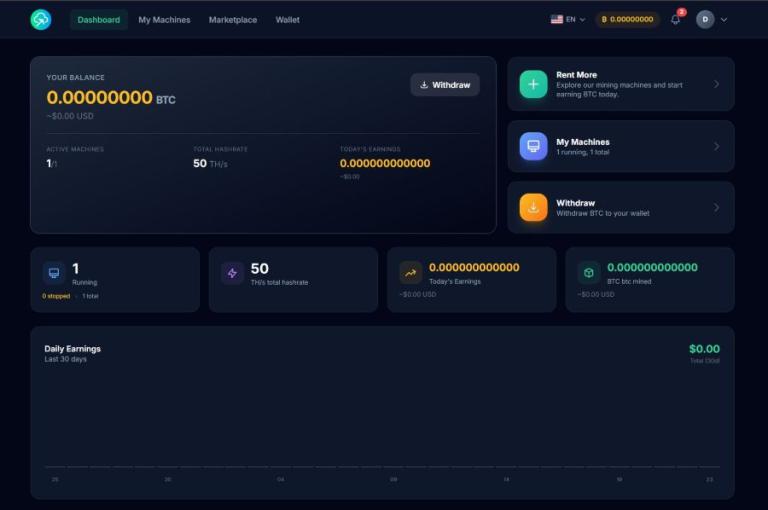
A weekly five-minute dashboard review beats obsessive daily checking — and it's all most cloud miners actually need. The seven numbers below explain why your BTC went up, down, or sideways in the last seven days: raw BTC earned, the rolling 7-day average, USD equivalent, network difficulty change, BTC price change, hashrate uptime, and your balance versus your withdrawal threshold. Pick one day, open the NoxHash dashboard, read them in order.
Why Weekly Beats Daily for Cloud Mining
BTC payouts drip every minute under FPPS accounting, which means your balance does change every time you reload the dashboard. That's exactly why daily checking hurts more than it helps. Intraday BTC price swings and one-day difficulty variance produce noise an order of magnitude larger than the signal you actually care about — are my contracts performing roughly as expected?
A weekly cadence smooths out both. Seven days is long enough for network difficulty to stabilize, short enough to catch a misbehaving miner before a whole month of earnings is affected, and aligned with how cloud contracts are priced (monthly, with weekly being roughly a quarter of a billing cycle). Think of it as a miner's weigh-in: accurate trend, no scale-hopping.
The seven numbers below are ordered the way you should read them — output first, then the forces that shaped it, then your own health signals, then the decision they feed.
The 7 Metrics, In Reading Order
BTC earned in the last 7 days
The rawest, least-filtered number. Read it off the 30-day earnings chart on your NoxHash dashboard — hover the last seven bars or sum the daily values. Healthy: roughly 7x your typical daily payout, plus or minus ~10%. Concerning: a drop greater than 20% that isn't explained by metrics 4, 5, or 6 below. If this number is off, you have a reason to dig — start with metric 6 (uptime) before assuming market forces, because hardware issues are the fastest to fix.
Rolling 7-day average BTC per day
Divide metric 1 by seven. This single-number smoothing is the most accurate forward-looking estimate of what tomorrow's payout should look like — better than yesterday's value, which can swing 15-25% on pool luck alone. Write it down every week. Healthy: a slow, gentle decline tracking difficulty growth (roughly 1-3% per difficulty-adjustment epoch). Concerning: a step-change — this week's average is 30%+ below last week's while difficulty barely moved.
USD-equivalent of weekly earnings
BTC is the accounting currency; USD is the reality check against your rental spend. The NoxHash dashboard already shows USD next to BTC balance using the live price ticker — note the figure on the day of your review so you can compare apples-to-apples next week. Healthy: weekly USD output covers roughly a week of pro-rated rental cost (monthly fee ÷ 4.3). Concerning: USD output falls more than the BTC price did, meaning you're losing on both volume and price together.
Network difficulty change week-over-week
Bitcoin adjusts difficulty every 2,016 blocks — roughly every two weeks — and a single adjustment can move by 5-8% either way. This is the single biggest explanation for why your hashrate stayed flat but BTC output fell. Check one trusted source (we use the Blockchain.com difficulty chart) and log the week-over-week percentage. Rule of thumb: a +5% difficulty adjustment means ~4-5% less BTC per TH/s, all else equal. That alone explains most "why did I earn less" questions.
BTC price change week-over-week
The second half of "why is my USD output different?" — BTC price. The NoxHash dashboard's live crypto ticker shows current BTC, but for week-over-week you want a specific anchor: note the price on review day. CoinGecko's BTC page gives a clean 7-day chart with an exact percentage. Use this to resist bad decisions: if price dropped 8%, stop worrying that your miner is broken. If price rose 8% and USD output still fell, metrics 4 and 6 are where the answer lives.
Effective hashrate uptime percentage
The one number that tells you the data center did its job. Open each active miner's status on your NoxHash dashboard — anything labelled "Running" on every check is a clean 100%-ish week. Healthy: 99%+ over seven days, matching our 99.9% uptime commitment across the fleet. Concerning: any unexplained "Stopped" status or a miner whose contract says it should be active but shows otherwise. Use the View Desktop function to glance at the CGMiner terminal if you want the raw evidence; support handles replacements within 4-8 hours.
Cumulative BTC balance versus your withdrawal threshold
The metric that turns reading into action. Look at the BTC balance at the top of the dashboard, then at the 8 most recent transactions below it — if you haven't withdrawn in a while, ask why not. The minimum withdrawal is 0.00001 BTC and the fee is 1.5%. Decision rule: pick a personal threshold (e.g. 0.001 BTC, or one week of rental spend), and when balance crosses it, withdraw unless you have a deliberate "let it accumulate" reason. Drift-by-default is how balances sit idle for months.
Weekly Review Checklist — Thresholds and Actions
Copy this into a note, a spreadsheet, or the margin of whatever you use to track money. Fill it in on the same day each week — most users pick Sunday evening or Monday morning, because difficulty adjustments typically land mid-week and your numbers will have settled by then.
| Metric | Healthy range | Action if out of range |
|---|---|---|
| 1. BTC earned in last 7 days | ~7x your daily average, +/- 10% | Check metric 6 (uptime) first, then 4 and 5 |
| 2. Rolling 7-day average BTC/day | Gentle decline tracking difficulty | Step-change of 30%+ warrants a support ticket |
| 3. USD equivalent weekly | Covers ~1 week of rental spend | Pause scaling plans if shortfall persists > 3 weeks |
| 4. Difficulty change WoW | +/- 0-5% per adjustment | Above +5%: expect proportionate BTC output drop — no action |
| 5. BTC price change WoW | +/- 5-10% in normal weeks | Don't act on a single week — look at the 30-day trend |
| 6. Effective hashrate uptime | 99%+ (Running status, all miners) | Open support ticket same day — techs swap in 4-8 h |
| 7. Balance vs withdrawal threshold | Below your pre-set trigger | Withdraw — 1.5% fee, minimum 0.00001 BTC |
Put the weekly review on the real dashboard — start with the free 2-day trial
The seven metrics and the checklist above all live on the NoxHash dashboard you'd use as a paying user. The 2-day Basic Miner trial gives you the exact same surfaces — BTC balance, 30-day chart, 8 recent transactions, live price ticker — so you can practise the ritual before any real money is involved.
4 Habits That Pair With the Weekly Review
The seven metrics tell you what to look at. These four habits make the ritual stickier and the data more useful over months — especially when you scale past a single Basic Miner.
Export the transaction log monthly
The dashboard shows the 8 most recent transactions. Once a month, screenshot or copy them into your spreadsheet — you'll be glad of the audit trail at tax time, and diffing month-to-month reveals slow drifts the weekly view misses.
Note the BTC price on review day
Price shifts minute-to-minute; your weekly review needs a fixed anchor. Write down the price at the moment you open the dashboard, and your week-over-week USD compare becomes defensible instead of noisy.
Log unusual difficulty moves
Jot down the difficulty percentage next to each weekly entry. After 8-12 weeks you'll have an intuition for "normal" (+/- 3%) versus "this is why my BTC output fell" (+5% or more) — and you'll stop blaming the platform for network behaviour.
Pick one "alarm metric"
Choose one of the seven that, if it moves suddenly, you'd actually act on — for most people it's metric 6 (uptime). Check it briefly mid-week without re-reading all seven. That separates real problems from noise without turning into daily checking.
If you want the deeper background on what "weekly" looks like when scaled across multiple miners, our eight habits for earning more BTC over time builds on the same review rhythm. For live BTC price and difficulty figures we reference CoinGecko's Bitcoin page.
Build the 5-minute habit on an account you already own
Exporting the transaction log, anchoring the BTC price, logging difficulty, and picking one alarm metric — none of those work until you have a dashboard to read. Open the account, activate the 2-day trial, and the four habits attach themselves to live data on your very first review.
Frequently Asked Questions
Why weekly and not daily?
Daily BTC output varies by 15-25% on pool-luck variance alone, so a single daily number is mostly noise. Seven days averages that out and roughly matches how Bitcoin's difficulty adjusts. Checking daily encourages reactive decisions you'd regret on a longer timescale — weekly keeps you informed without over-trading.
My BTC output dropped this week — how do I know if it's the platform or the network?
Read metrics 4 and 6 together. If difficulty rose 5% and uptime is still 99%+, the network explains the drop and nothing is broken. If difficulty barely moved and you see any Stopped status or unexpected gap in the 30-day chart, that's a platform issue — open a support ticket same day.
Do I need a spreadsheet, or is the dashboard enough on its own?
The NoxHash dashboard covers metrics 1, 2, 3, 6, and 7 natively via the 30-day chart, BTC balance, live price ticker, and miner status. You only need a spreadsheet for the week-over-week diff — seven rows, seven columns, five minutes. Most users eventually add a spreadsheet once they pass two or three rented miners.
Should I withdraw every week or let the BTC accumulate?
That's metric 7's job. The 1.5% withdrawal fee favours batching rather than weekly micro-withdrawals, but sitting on BTC indefinitely exposes you to price risk you may not want. Pick a personal threshold — e.g. 0.001 BTC, or one week of rental spend — and withdraw when balance crosses it, unless you have a specific HODL thesis.
What about fees paid to date — shouldn't that be a metric?
Fees are the bonus eighth metric — pool fee (already baked into FPPS payouts) plus withdrawal fees (1.5% per withdrawal). They belong on a monthly review rather than weekly, because small weekly fluctuations don't change the picture. Add a running total next to your monthly transaction log export.
Educational content — not financial advice
This article describes a weekly monitoring routine and does not guarantee any particular BTC or USD outcome. Mining revenue depends on BTC price and network difficulty, both of which are volatile and outside your control. Thresholds quoted here are general guidance, not financial advice; your own thresholds should reflect your personal risk tolerance and local tax rules. Past performance does not guarantee future results. Only commit funds you can afford to lose, and verify local cryptocurrency regulations before operating any mining activity in your jurisdiction.