7 Cloud Mining Records You Should Keep for Tax Season
Export these 7 cloud mining records every month — deposits, BTC rewards, withdrawals, balances, prices — so tax season isn't a scramble. 2026 checklist.

Cloud mining looks simple on the dashboard — but at tax time you suddenly need seven different records your jurisdiction may ask for: USDT deposit invoices, the daily BTC reward log, withdrawal receipts, month-end balance snapshots, BTC price at every taxable event, the USDT-to-BTC conversion rate at deposit, and proof of account control. Export them as you mine, not next April.
Why Cloud Mining Record-Keeping Is a Year-Round Job, Not a February Panic
Most tax authorities — the US IRS, UK HMRC, Australian ATO, most EU tax offices, Japan's NTA, Korea's NTS, Vietnam's MOF — treat mining rewards as ordinary income at fair market value on the date of receipt, and any later BTC disposal as a separate capital event. That means every single BTC payout NoxHash credits to your wallet is potentially a dated income line, and every withdrawal is potentially a disposal. Reconstructing 365 days of that from memory in April is impossible.
The fix is boring but powerful: export the data while it's fresh, monthly, into a dated folder. Seven record types cover the full lifecycle — money in (deposits), money earned (rewards), money out (withdrawals), snapshots (balances), price (valuation), FX (USDT conversion), and control (proof of custody). The rest of this guide walks each one, shows where to find it on NoxHash, and ends with a one-page monthly habit list.
The 7 Records to Keep — In the Order They Happen
USDT rental deposit invoices — every inbound transfer
Each time you fund the account to rent a miner, record the date and UTC timestamp, the exact USDT amount (including the cents pattern NoxHash uses to auto-match the transfer — e.g. $100.03 or $50.07), the network (TRC-20 or BEP-20), the destination deposit address, the transaction hash, and the spot BTC price at that moment. In many jurisdictions the rental itself is a business expense; your tax professional needs the amount and timestamp to categorise it correctly.
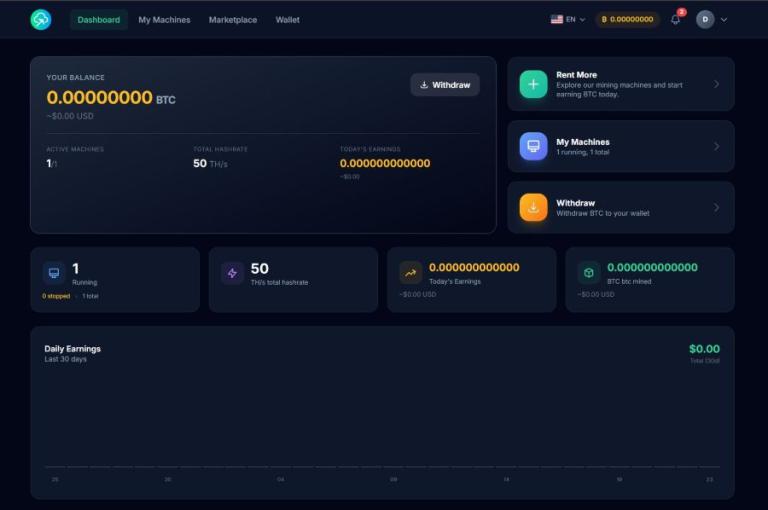
Where to find it on NoxHash: the Transactions page (user dashboard) lists every deposit with its TXID; confirmation emails carry the same data. Save both the CSV export and the confirmation email.
Mining reward log — BTC earned, daily or per payout, with fair market value
NoxHash credits BTC to your wallet every minute via FPPS pool accounting. For tax purposes, most jurisdictions only need a daily aggregate: total BTC earned that day and the USD fair market value at the time of receipt. That USD value is typically what gets reported as ordinary income. Don't rely on the wallet balance alone — you need the delta per day, not a running total.
Where to find it on NoxHash: the dashboard's 30-day earnings chart shows BTC + USD per day; the Transactions page lists each mining credit. Export monthly to a spreadsheet column layout: date, BTC earned, BTC/USD price at close, USD equivalent.
Withdrawal records — every BTC send-out with destination, fee, and USD value
Every time you withdraw BTC to an external address, capture seven things: the request date/time, the gross BTC amount, the 1.5% NoxHash withdrawal fee, the net BTC received, the destination address (bc1… / 1… / 3…), the on-chain TXID once broadcast, and the BTC/USD spot price at the moment of withdrawal. In many jurisdictions the move off-platform is treated as a disposal, which triggers a capital gain or loss versus the cost basis of those coins.
Where to find it on NoxHash: the Withdrawal history table shows status, fee, net amount, destination, and TXID. Screenshot the confirmation page or save the email — the TXID is your on-chain proof.
Monthly balance snapshots — BTC held on platform at month-end
Several jurisdictions — Japan, Korea, parts of the EU, and US filers above the FBAR/Form 8938 thresholds — care about your end-of-period holdings on non-custodial or foreign platforms. On the last day of each month, record the BTC balance in your NoxHash wallet, the BTC/USD price at that snapshot, and the USD-equivalent value. This gives you 12 clean monthly marks plus a year-end figure instead of trying to reconstruct it later.
Where to find it on NoxHash: the main dashboard shows the BTC balance and USD equivalent at the top. Screenshot it on the final day of each month — a dated PNG is a perfectly acceptable audit artefact.
BTC price at every taxable event — a dated spot-price CSV
Fair market value drives almost every number on a crypto tax return: income at receipt, cost basis at receipt, proceeds at disposal. Rather than looking it up 300 times in April, download a full-year BTC/USD daily CSV from CoinGecko's Bitcoin historical data or a similar reputable source. Keep the file dated (e.g. btc-usd-2026.csv) so your CPA can reconcile any line back to a defensible price.
Where to find it on NoxHash: NoxHash surfaces live BTC/USD on the dashboard and stamps every transaction with a price at the time, but the archive of daily spot prices is best sourced externally — the dashboard shows current, not historical third-party rates.
USDT-to-BTC conversion rate at deposit — NoxHash's internal FX
When USDT lands in your account, NoxHash converts it to BTC at the real-time rate to rent machines denominated in BTC hashrate. Some tax treatments view this as a stablecoin-to-BTC trade, not a simple deposit — a micro-disposal that, while small, should be documented for completeness. Save the USDT amount in, the BTC amount credited, and the implied BTC/USD rate at that moment. Even where it's treated as internal housekeeping, your CPA will want the paper trail.
Where to find it on NoxHash: the deposit confirmation email and the Transactions page show the USDT-in / BTC-out pair with a timestamp. Export monthly alongside Record #1.
Proof of account control — 2FA setup and login records
Where tax authorities debate whether a user had "constructive receipt" of crypto sitting on a platform — i.e. whether it was genuinely yours to dispose of — the simplest proof is that you controlled the login. Save a dated screenshot of your 2FA-enabled Profile page, your eight recovery codes stored offline, and occasional login-history exports. Add a dated screenshot of any API keys you've issued. None of this is glamorous, but it answers the "was it really your BTC?" question in one page.
Where to find it on NoxHash: Profile → Security shows 2FA status, recovery code regeneration, and API key list. Screenshot once after setup, and again any time you rotate a credential.
Records Checklist — Source, Frequency, Export Format
The table below collapses the seven records into a one-page reference. Pin it on your desktop or clip it into the folder where you keep the monthly exports; a year from now you'll thank yourself for the five minutes it takes each month.
| Record | Source on NoxHash | Frequency | Export format |
|---|---|---|---|
| 1. USDT deposit invoices | Transactions page + email | Per deposit | CSV + email archive |
| 2. Mining reward log | Dashboard chart + Transactions | Monthly aggregate | CSV (date, BTC, USD) |
| 3. Withdrawal records | Withdrawal history + email | Per withdrawal | CSV + TXID screenshot |
| 4. Month-end balance snapshot | Main dashboard | Last day of month | Dated PNG screenshot |
| 5. BTC daily price archive | CoinGecko historical data | Yearly download | CSV (daily OHLC) |
| 6. USDT/BTC conversion rate | Deposit email + Transactions | Per deposit | Same CSV as Record #1 |
| 7. Proof of account control | Profile → Security | Once + on any change | Dated PNG screenshot |
Every row in that checklist lives inside your NoxHash dashboard — open it and export
The Transactions page, the Withdrawal history, and the main balance card between them generate six of the seven records above. Log in, check the export format column, and you'll have 11 months of tax-season prep done before next April.
One Framework, Many Jurisdictions
The seven records work because most tax regimes converge on the same structural questions, even if the rates and thresholds differ wildly. The US, UK, Australia, Canada, and most EU countries treat mining rewards as ordinary income at fair market value on receipt, with a separate capital event on disposal. Japan stacks mining income into a progressive "miscellaneous income" bracket. Korea's framework distinguishes income from disposal with its own thresholds. Vietnam's treatment of crypto is still evolving and best confirmed locally.
What changes by country: the rates, the thresholds, the filing forms, the disclosure schedules. What doesn't change: you need dated deposits, dated rewards with fair market value, dated withdrawals, dated balances, a price archive, an FX trail, and proof of control. Keep those seven, and a local CPA can slot them into whatever form your jurisdiction uses this year.
4 Monthly Habits That Save Hours at Year-End
Export the transaction CSV once a month
Set a recurring calendar reminder for the first of the month. Download the previous month's full transaction list from the NoxHash dashboard, save it into a dated subfolder (2026-03/, 2026-04/). Ten minutes a month replaces two weeks of scrambling next April.
Log every withdrawal to a personal sheet
Withdrawals are your highest-impact tax events (often a disposal). The moment one confirms, add a row to a personal spreadsheet: date, gross BTC, 1.5% fee, net BTC, destination, TXID, BTC/USD spot price. The friction of one extra row now prevents reconstruction work later.
Snapshot the BTC balance on the last day of each month
Open the NoxHash dashboard on the 30th or 31st, screenshot the BTC balance card with its USD equivalent visible, and save the PNG into the same monthly folder. Twelve dated screenshots = a year of clean period-end marks, which is enough for most jurisdiction's holdings disclosure.
Keep rental receipts in a dated folder
Forward every NoxHash rental and deposit confirmation email into a dedicated mailbox label (e.g. "Mining / 2026") or a cloud folder. Emails carry timestamps, amounts, and network information that may not survive a browser cache clear. Two clicks per email; a complete audit trail at year-end.
For the US perspective on what counts as income and disposal on crypto, the IRS publishes its digital-assets guidance directly on irs.gov, which is a useful reference point even if you file elsewhere — many other tax authorities have mirrored the structural approach.
Set up the four monthly habits from the account you haven't exported from yet
The CSV export, the withdrawal log, the month-end snapshot, and the rental-email folder all start with one login. Open NoxHash, run the first monthly export this weekend, and roll the habit forward — this time next year, tax prep is a folder, not a project.
Frequently Asked Questions
Does NoxHash file taxes or issue a 1099-style form for me?
No. NoxHash provides the data — deposit records, mining credits, withdrawals, balances — but reporting obligations sit with you and your local tax authority. Export the seven records each month, hand them to a CPA familiar with crypto in your jurisdiction, and they will translate them into whatever local form you need.
Why save BTC price data separately if NoxHash already shows it?
NoxHash shows the live price — useful in the moment, not ideal as a historical audit reference two years later. An independent daily BTC/USD CSV from CoinGecko or Blockchain.info gives your CPA a reproducible third-party price feed, which strengthens the defensibility of every valuation in your return.
Is the USDT-to-BTC deposit conversion actually a taxable event?
It depends on your jurisdiction and your CPA's reading of the facts. Some treat stablecoin-to-BTC as a crypto-to-crypto trade; others look through to the underlying rental and ignore the conversion. The safe approach is to document it with the timestamp and implied rate and let your tax professional decide how to treat it.
What if I only used the 2-day free trial and never deposited?
The NoxHash free trial credits simulated BTC that is not added to your real wallet, so there is typically nothing to report. Keep a screenshot of the trial activation and expiry dates for completeness, but no deposit, reward, or withdrawal record applies until you fund the account and receive real BTC payouts.
How far back should I keep these records?
Retention rules vary: the US IRS generally expects 3-7 years, UK HMRC asks for 5-6 years, many EU tax offices require 6-10. For crypto specifically, many CPAs advise keeping records for the life of the asset plus the statutory retention window, since cost basis can matter years later. When in doubt, keep them.
Educational record-keeping — not tax, legal, or financial advice
This article describes general data you may want to retain if you use a cloud mining platform. It is not tax advice, legal advice, or financial advice, and nothing in it should be relied on as such. Tax treatment of cryptocurrency income, disposals, holdings disclosure, and foreign platform reporting varies significantly by country, by state or province, and over time. The IRS, HMRC, ATO, CRA, EU member-state tax authorities, Japan's NTA, Korea's NTS, and Vietnam's MOF each have their own definitions, thresholds, forms, and deadlines — and those rules change. NoxHash does not prepare, review, or file tax returns, and does not provide per-user tax guidance. Before you act on anything in this article, consult a qualified CPA, tax lawyer, or registered tax agent licensed in your jurisdiction who can apply current local rules to your specific facts. Mining revenue itself also depends on BTC price, network difficulty, and market conditions, none of which are under your control. Past performance does not guarantee future results. Only commit funds you can afford to lose.