New Feature: 30-Day Earnings Chart with BTC & USD View
NoxHash dashboard now ships a 30-day BTC earnings bar chart with a one-click USD toggle — separate difficulty effects from price swings at a glance.

The NoxHash dashboard now includes a 30-day earnings bar chart with a one-click toggle between BTC and USD views. Each bar is one day of mining output from your rented miners, so you can see difficulty swings and BTC price moves as two separate stories instead of one blurred line.
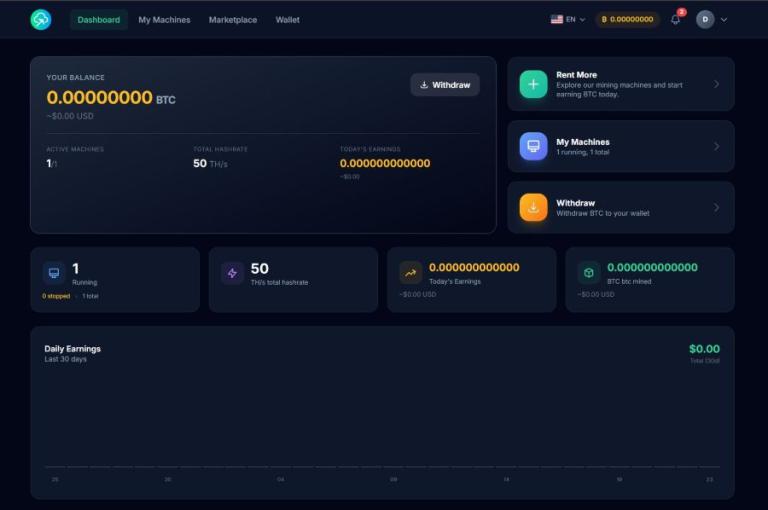
What the 30-Day Chart Actually Shows
The chart is a simple bar chart: the x-axis is the last 30 days, the y-axis is daily earnings, and each bar is one 24-hour window of mining output from every miner on your account, summed together. When a miner is running, the day accumulates; when a miner is stopped or expired, that day's bar is smaller.
Mining on NoxHash is denominated in BTC — your rented hashrate produces sats every minute into the wallet. The chart's default view is therefore BTC, so you see the raw output of your fleet without the noise of a moving exchange rate. One tap on the toggle flips each bar to its USD value at the time the sats were credited, which is the number most people intuitively think in.
It's built as the answer to a specific question: "Did I earn more this week, or did BTC just go up?" Without a dual view, that question has no clean answer. The chart lets you separate the two in about three seconds.
BTC View vs USD View — Why You Want Both
Each view answers a different question. Neither is "better" — they are complementary, and switching between them is the habit the chart is designed to build.
| Dimension | BTC view | USD view |
|---|---|---|
| What it measures | Raw sats credited per day | USD value at the time sats landed |
| Affected by BTC price | No | Yes |
| Affected by difficulty | Yes | Yes |
| Best for | Spotting hashrate or network changes | Comparing against your monthly rental cost |
| Bars move when | You add or stop a miner, or difficulty adjusts | Any of the above, plus BTC price |
A practical rule: if the BTC bars are flat but the USD bars dropped, that's a price move, not a mining problem. If both dropped together, the network side of the equation changed — and the difficulty adjustment chart is where to look next.
Three Patterns Worth Watching For
Once you have 30 days of bars in front of you, a few patterns become easy to read. These are the three we'd open the chart for most often.
A visible step-down in BTC
If BTC bars drop to a new, lower plateau on a specific day and stay there, that's usually a difficulty adjustment. The network retargets roughly every two weeks; your BTC per day follows.
Steady BTC, volatile USD
Flat BTC bars with wavy USD bars tell you the network is stable and your fleet is performing — the mood swings are entirely the BTC price. Don't confuse a price dip for a mining problem.
A day that's near-zero
A bar much shorter than its neighbours usually means a miner was stopped, expired, or on free trial that day. Cross-check the miner list — free-trial earnings show here but don't credit the wallet.
None of this requires you to be a trader — the chart is designed so a glance gives you the shape of the month, and tapping between BTC and USD separates the two biggest forces at play.
See the three patterns on your own 30-day chart
Spotting a difficulty step-down or a price wave is easier with your own bars in front of you. Create a free account, claim the 2-day Basic Miner trial, and the chart starts filling in from day one — the BTC/USD toggle works in the trial too.
Where the Chart Sits on the Dashboard
The 30-day chart is one of five data cards on the dashboard. Together they give you the long view, the short view, and the fleet status in a single screen — no extra clicks, no separate analytics page.
BTC wallet balance
The withdrawable figure with a USD-equivalent conversion next to it, updated in real time from the market rate.
30-day earnings chart (new)
Bar-per-day over the last 30 days with the BTC and USD toggle. Hover any bar to read the exact value for that date.
Today's earnings and all-time BTC
One card for the current 24-hour window, one for the cumulative total across the life of your account, each in BTC with USD equivalent.
Active miner count and total hashrate
How many miners you have running right now, plus the summed TH/s. The context that makes the chart's bars understandable.
Frequently Asked Questions
What timezone does the chart use?
Each bar represents one calendar day in UTC, which keeps daily totals consistent regardless of where you log in from. If you live many hours off UTC, a bar may appear to include "tomorrow" or "yesterday" relative to your local clock — the values themselves are unchanged.
Does the chart include my free-trial earnings?
Yes, free-trial days appear on the chart so you can see how the Basic Miner behaves over 48 hours. Important: trial earnings are display-only and do not credit the withdrawable wallet. The chart shows the output; the wallet balance card confirms what's actually yours to withdraw.
Why does my first day have a small bar?
Your first bar is a partial day — it only covers from the moment your miner activated until the end of that UTC day. If you start a Basic Miner at 20:00 UTC, day one is four hours of output. From day two onward, bars reflect full 24-hour windows and become directly comparable.
Is the USD value historical or live?
The USD view uses the BTC price at the time each sat was credited, not the current spot price. This keeps the bars honest — a 30-day-old bar isn't retroactively revalued when BTC moves today, so the chart is a truthful record of what the earnings were worth at the moment.
Can I export the chart data to CSV?
CSV export isn't part of this first release. For now, the full daily history is available per miner on its detail page, and transaction records for earnings credits appear in the wallet's transaction list. A direct chart export is on the roadmap.
Where do I see earnings older than 30 days?
The all-time BTC mined card on the dashboard shows the cumulative total from day one of your account, with its USD equivalent. For day-level history beyond 30 days, the wallet transaction list records every mining credit with timestamp and amount, so nothing is lost.
Not financial advice
This article describes a dashboard feature. Historical earnings shown in the chart are not a projection of future output — daily bars are shaped by BTC price, network difficulty, and broader market conditions, all of which can move sharply and sit outside our control. Past performance does not guarantee future results. Only commit funds you can afford to lose, and consider consulting a local tax advisor about crypto earnings in your jurisdiction.